Proven Zoho CRM Implementation Roadmap: The Complete Step-by-Step Guide for 2026

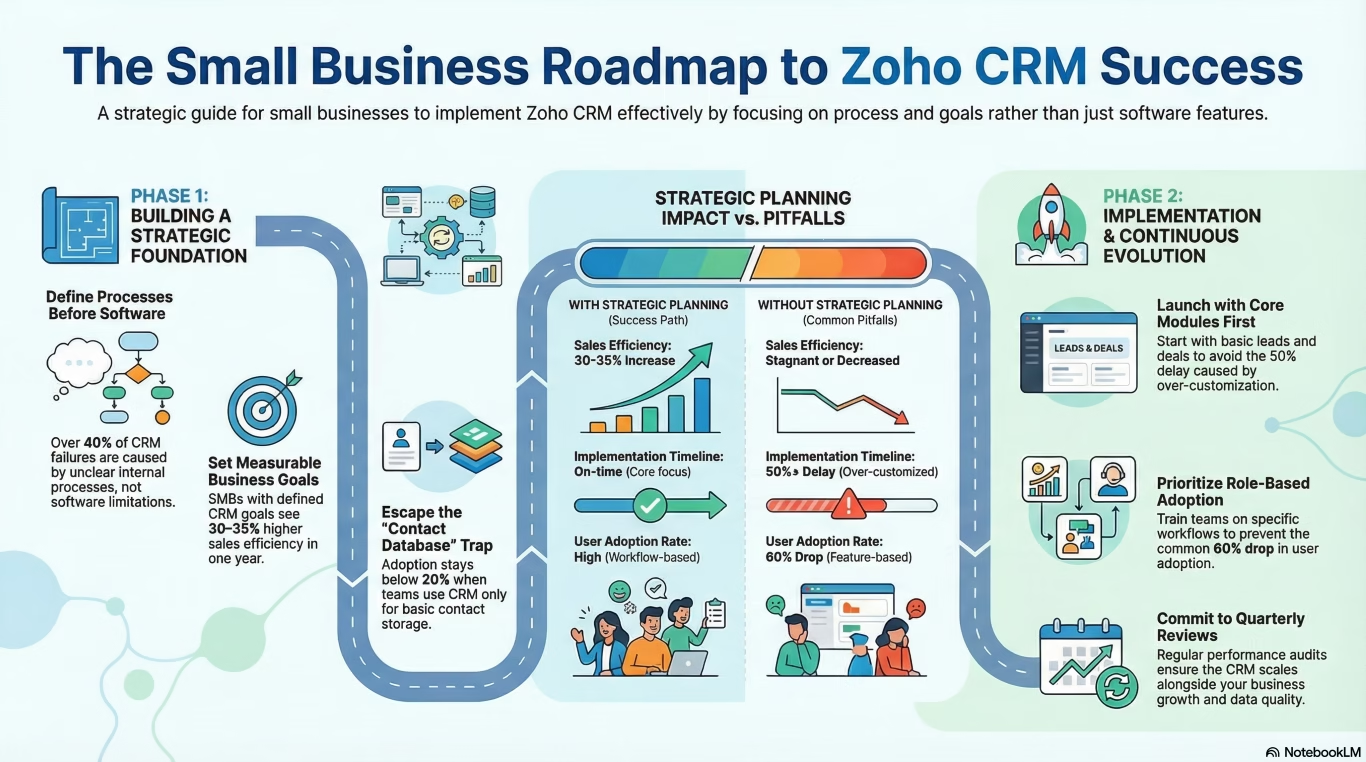
A proven Zoho CRM implementation blueprint — from goal-setting and data migration to team training and advanced automation — so your rollout is smooth, not stressful.
Comprehensive blog post: Roadmap to implement Zoho CRM for your business
Proven Zoho CRM Implementation Roadmap: The Complete Step-by-Step Guide for 2026
A proven Zoho CRM implementation blueprint — from goal-setting and data migration to team training and advanced automation — so your rollout is smooth, not stressful.
- Why Zoho CRM and is it right for you?
- Phase 1 — Discovery & goal setting
- Phase 2 — Account setup & configuration
- Phase 3 — Data migration
- Phase 4 — Workflow automation
- Phase 5 — Team onboarding & training
- Phase 6 — Go-live, optimise & scale
- Common pitfalls to avoid
- Success metrics to track
Why Zoho CRM — and is it right for you?
A successful Zoho CRM implementation starts with a clear picture of what your sales process actually looks like today. Sales teams lose an average of 30% of their working hours to manual tasks that a CRM could automate. Leads fall through the cracks. Follow-ups get forgotten. Reporting takes hours instead of minutes. Zoho CRM was built to fix exactly this — and at a price point that doesn’t require enterprise-level budgets.
Zoho CRM is best suited for:
Good fit
- SMBs with 5–500 person sales teams
- Businesses already in the Zoho ecosystem
- Companies needing deep CRM customisation
- Teams managing B2B pipeline with multiple touchpoints
- Organisations with complex approval workflows
Think twice if…
- You need enterprise-grade AI natively (consider Zoho CRM Plus)
- Your team is highly non-technical and change-resistant
- You have fewer than 3 active salespeople
- You rely heavily on niche third-party integrations
For a breakdown of the platform itself before you commit, see our guide to top Zoho CRM features for business growth. Still comparing options? Our Zoho CRM vs Salesforce comparison covers the key differences.
Before you begin: Get executive sponsorship locked in. The #1 reason CRM implementations fail isn’t technology — it’s people. Having a senior champion who actively promotes adoption changes everything.
The 6-Phase Zoho CRM Implementation Roadmap
Most businesses approach Zoho CRM implementation as one big sprint and end up overwhelmed. This phased approach breaks the work into manageable, testable chunks — each one building on the last.
Phase 1 — Zoho CRM Implementation: Discovery & Goal Setting
Phase 1 sets the foundation your entire Zoho CRM implementation depends on. Rushing into configuration without a clear map of your sales process is the single most common (and expensive) mistake. Two weeks of upfront discovery will save you months of rework.
Zoho CRM Implementation Checklist: Phase 1 Steps
Map your current sales process end-to-end
Walk every lead through from first touch to closed deal. Document every stage, every handoff, and every tool currently in use. Don’t redesign it yet — just map what actually happens today.
Identify pain points and bottlenecks
Interview your salespeople, SDRs, and customer success team. Where do deals stall? What manual work eats their time? What data do they wish they had?
Define 3–5 measurable goals
Be specific. “Improve sales efficiency” is not a goal. “Reduce average lead response time from 48 hours to under 4 hours within 90 days” is a goal you can measure and celebrate.
Assign an internal CRM owner
This person is responsible for configuration decisions, training, and ongoing maintenance. It can be a sales ops person, a senior rep, or even a founder — but it must be one named individual.
Audit your existing data
Where does your contact and deal data live today? Spreadsheets? Another CRM? Email? Understanding this now prevents panic during migration.
Output of Phase 1: A one-page sales process map, a list of 3–5 CRM success metrics, a named CRM owner, and a data audit checklist. If you can’t produce these, you’re not ready to configure anything yet.
Phase 2 — Account setup & configuration
This is where your Zoho CRM implementation starts taking shape. The goal at this stage of your Zoho CRM implementation is to build a system that mirrors your real sales process — not a generic template that your team will ignore.
Org settings & modules
- Set your business hours, timezone, and currency in Admin Panel
- Enable only the modules you’ll actually use (Leads, Contacts, Accounts, Deals, Activities — resist adding everything at once)
- Rename default fields to match your team’s language (“Leads” might be “Prospects” in your business)
- Configure your deal stages to match your mapped sales process exactly
Custom fields & layouts
- Add custom fields for industry-specific data you captured in Phase 1 (e.g. “Industry vertical”, “Contract value range”, “Source channel”)
- Build page layouts per role — your SDRs and AEs shouldn’t see the same view
- Mark required fields carefully — too many required fields kill adoption
User roles & permissions
- Create role hierarchy: Admin → Sales Manager → Account Executive → SDR
- Set data sharing rules — who can see whose records?
- Configure territory management if you have geo-based sales teams
Common Zoho CRM implementation mistake: Giving everyone admin access “just to make it easier.” This leads to accidental field deletions, broken workflows, and security risks. Set up roles properly from day one.
Email & Calendar Integration in Your Zoho CRM Implementation
- Connect Gmail or Outlook via Zoho CRM’s native integration
- Enable email intelligence (track open and click rates on CRM emails)
- Sync Google Calendar or Outlook Calendar for meeting logging
- Set up email templates for your most common outreach sequences
Phase 3 — Data migration
Data migration is where good Zoho CRM implementations go bad. The key principle: clean it before you move it. Migrating dirty data just gives you dirty data inside a new system.
The 4-step migration process
Export and audit your source data
Export all contacts, accounts, and deals from your current system (or spreadsheets). Open it in Excel or Google Sheets. Look for duplicate entries, missing emails, inconsistent formatting, and outdated records.
Clean the data
Deduplicate contacts (Zoho has a built-in deduplication tool but it’s easier to clean first). Standardise country and phone number formats. Remove contacts who haven’t engaged in over 2 years unless you have a specific reason to keep them.
Map source fields to Zoho fields
Create a field mapping document. “Company” in your spreadsheet maps to “Account Name” in Zoho. “Deal size” maps to “Amount.” Every unmapped field is data you’ll lose.
Import in Stages and Validate Your Zoho CRM Implementation Data
Import a small test batch first (50–100 records). Check that everything landed correctly before importing the full dataset. Then import in this order: Accounts → Contacts → Deals → Activities.
Pro tip: Use Zoho’s Import module (not a third-party tool) for standard migrations. For complex migrations with millions of records or multiple source systems, Zoho offers a paid Data Migration Service — it’s worth it at scale.
Phase 4 — Workflow automation
Phase 4 is where your Zoho CRM implementation earns its keep. Automation removes the repetitive work that kills rep motivation and lets your salespeople focus on selling.
Start with these 5 automations first
Lead auto-assignment
When a new lead is created (from a web form, import, or manual entry), automatically assign it to the right rep based on territory, industry, or round-robin. No more “who owns this?” conversations.
Instant lead follow-up email
When a lead submits a demo request form, Zoho automatically sends a personalised confirmation email within 60 seconds. Your prospects feel attended to even at 2am.
Stale deal alerts
If a deal hasn’t had any activity in 7 days, send the rep an email alert and create a task to follow up. This workflow alone recovers deals that would otherwise die silently.
Deal stage update notifications
When a deal moves to “Proposal Sent,” automatically notify the sales manager and create a follow-up task for the rep in 3 days.
Won deal handoff to operations
When a deal is marked “Closed Won,” automatically create a task for your onboarding or finance team. The sale ends — the relationship begins.
Advanced Zoho CRM Implementation: Flow & Blueprints
Once your basic workflows are running smoothly, explore Blueprints — Zoho’s process management tool that enforces your sales process step-by-step. Blueprints ensure a deal can only move to “Proposal Sent” after a call has been logged. No shortcuts.
For a detailed walkthrough of pipeline automation, read our guide: Automating Your Sales Pipeline with Zoho Flow and CRM. For cross-app automation (connecting Zoho CRM to Zoho Books, Zoho Desk, Slack, or WhatsApp), use Zoho Flow — Zoho’s native automation platform, similar to Zapier but tighter within the Zoho ecosystem.
Don’t over-automate in Phase 4. Start with 5 automations. Run them for 4 weeks. See what breaks or causes confusion. Then add more. Teams that automate everything at once spend months cleaning up the resulting chaos.
Phase 5 — Team onboarding & training
The best Zoho CRM implementation fails without team adoption. Training isn’t a one-time event — it’s an ongoing investment in getting your people to use the system consistently.
Before go-live
- Create a sandbox environment with test data — let reps explore without fear of breaking anything
- Run role-specific training sessions (SDRs need different training than AEs or managers)
- Create a 1-page quick reference guide for each role — what they do every day, step by step
- Record short screen-capture videos for the most common tasks
During rollout
- Identify 2–3 “power users” who will be internal champions and first-line support
- Hold a live Q&A session the week after go-live
- Make it clear where reps go for help (Slack channel, internal wiki, or nominated CRM owner)
Ongoing Adoption: Sustaining Your Zoho CRM Implementation
- Review CRM activity reports weekly — identify reps not logging activities and coach them
- Tie CRM usage to your 1:1 agenda (“Let’s look at your pipeline in Zoho together”)
- Celebrate wins that came from CRM-driven follow-up — make the tool the hero
The trust question: One of the biggest hurdles in any Zoho CRM implementation is rep buy-in. Many reps feel a CRM is surveillance, not support. Address this directly: “This tool is here to help you hit your quota and remember your follow-ups — not to monitor you.” Culture, not technology, drives adoption.
Phase 6 — Go-live, optimise & scale
Going live marks the completion of your core Zoho CRM implementation — but it’s the starting pistol for your optimisation loop. The first 90 days post-launch determine long-term success.
The First 30 Days of Your Zoho CRM Implementation Post Go-Live
Run a daily adoption check
Pull a report each morning showing logins, activities logged, and deals updated. Watch for the “it’s too hard” signal — usually reps going back to spreadsheets or email for tracking.
Fix what isn’t working fast
If three reps complain about the same thing in the first week, fix it that week. Early frustrations that fester become permanent workarounds.
Start using reports in management meetings
When managers reference Zoho dashboards in every pipeline review, reps understand immediately that data quality is now consequential.
Days 30–90: Optimise
- Review your Phase 1 success metrics — are you trending toward them?
- Audit your workflows — which automations are firing correctly vs. creating noise?
- Remove unused fields and modules — simplify, don’t expand
- Explore Zoho Analytics for deeper pipeline and revenue reporting
Scaling Your Zoho CRM Implementation Beyond Sales
Once sales adoption is solid, consider expanding your Zoho CRM implementation across the whole business. Our Zoho One implementation plan covers the full cross-app approach:
Common Zoho CRM Implementation Pitfalls to Avoid
Configuration mistakes
- Too many required fields from day one
- Building for an idealised process, not the real one
- Skipping role-based permissions setup
- Over-customising before the team even uses it
- Not testing workflows before go-live
People & process mistakes
- No internal CRM owner assigned
- Skipping executive buy-in
- One-size-fits-all training for all roles
- Not tying CRM data to sales reviews
- Treating go-live as the end, not the beginning
Data mistakes
- Migrating all historical data without cleaning first
- Skipping field mapping documentation
- Importing in the wrong order (contacts before accounts)
- No data governance policy post-launch
Automation mistakes
- Automating too much too soon
- Not setting conditions on workflows (everything fires)
- Building blueprints before reps trust the system
- Forgetting to test edge cases
Zoho CRM Implementation Success Metrics to Track
You defined your goals in Phase 1. Now here’s a broader set of metrics that indicate a healthy Zoho CRM implementation. Track these every 30 days after your Zoho CRM implementation goes live:
Beyond adoption metrics, track business outcomes at the 90-day mark:
- Pipeline visibility — can your manager forecast next quarter’s revenue with confidence?
- Win rate — is the data quality good enough to analyse what’s working in your sales process?
- Ramp time — are new hires hitting quota faster because their pipeline history is available in Zoho?
- Time saved — how many hours per week has automation saved each rep?
The real measure of Zoho CRM implementation success isn’t how many features you’ve turned on — it’s whether your salespeople would be frustrated if Zoho CRM suddenly disappeared. That’s the moment you know the implementation worked.
Ready to Start Your Zoho CRM Implementation?
Use this roadmap as your project checklist. Download it, share it with your team, and assign owners to each phase before you touch a single configuration setting.
Share this content: