Revolutionize Your Sales Pipeline: Powerful Automation Made Simple with Zoho Flow and CRM

In today’s competitive business landscape, manual sales processes are not just inefficient—they’re business killers. Studies show that sales teams spend only 35% of their time actually selling, with the remaining 65% consumed by administrative tasks, data entry, and repetitive processes.
What if you could flip that ratio? What if your sales team could focus on building relationships and closing deals while automation handles the routine work?
Enter Zoho Flow and CRM automation—a powerful combination that transforms chaotic sales processes into streamlined, predictable revenue machines. In this comprehensive guide, we’ll explore how to leverage these tools to automate your entire sales pipeline, from lead capture to deal closure and beyond.
Understanding Sales Automation: The Foundation of Modern Revenue Growth
What is Sales Automation?
Sales automation is the strategic use of technology to eliminate manual, repetitive tasks throughout the sales process. It encompasses everything from automatic lead assignment and follow-up emails to complex workflow triggers that move prospects through your pipeline based on their behavior and engagement.
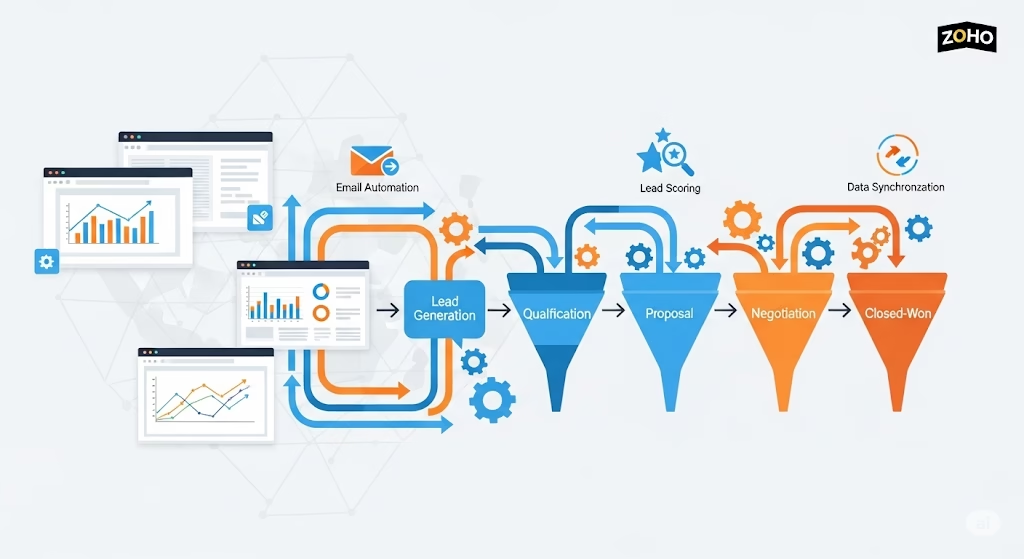
Think of automation as your invisible sales assistant that:
- Never forgets to follow up with a prospect
- Instantly routes leads to the right salesperson
- Tracks every customer interaction automatically
- Sends personalized messages at precisely the right moment
- Updates records and generates reports without human intervention
The Business Impact of Sales Automation
Companies that implement comprehensive sales automation see remarkable results:
- 41% increase in revenue within 6-9 months of implementation
- 30% reduction in sales cycle length
- 50% improvement in lead conversion rates
- 60% decrease in administrative workload
- 25% increase in sales team productivity
But automation isn’t just about efficiency—it’s about consistency, scalability, and creating predictable revenue growth that doesn’t depend on individual heroics.
The Zoho CRM Automation Ecosystem: Built-in Intelligence for Sales Success
Zoho CRM comes equipped with a comprehensive suite of automation tools designed to handle every aspect of your sales process. Let’s explore the key automation capabilities that form the foundation of your automated sales machine.
1. Workflow Rules: The Backbone of CRM Automation
Workflow Rules are conditional automation triggers that execute specific actions when certain criteria are met. They operate on a simple but powerful if-then logic:
Common Workflow Rule Applications:
- Lead Qualification: Automatically assign lead scores based on company size, industry, or engagement level
- Follow-up Automation: Send reminder emails to sales reps when deals haven’t been updated in X days
- Data Enrichment: Update record fields automatically based on other field changes
- Approval Processes: Route high-value deals through management approval workflows
Example Workflow Rule:
IF Deal Value > $50,000 AND Deal Stage = "Proposal Sent"
THEN Send email alert to Sales Manager + Create follow-up task for Account Owner
2. Blueprint: Visual Process Automation
Blueprint transforms your sales methodology into an automated, enforceable process that guides sales reps through every stage of the customer journey.
Key Blueprint Features:
- Stage-by-Stage Guidance: Define exactly what must happen at each pipeline stage
- Mandatory Field Updates: Ensure data quality by requiring specific information before stage advancement
- Conditional Pathways: Create different process flows based on deal characteristics
- Approval Gates: Build in management checkpoints for high-value opportunities
Real-World Blueprint Example: A software company uses Blueprint to enforce their sales methodology:
- Discovery Stage: Requires completion of needs assessment form
- Proposal Stage: Mandates technical requirements documentation
- Negotiation Stage: Triggers legal review for contracts over $100K
- Closed Won: Automatically creates onboarding tasks and notifies customer success
3. Email Templates and Sequences
Automated Email Communications ensure consistent, timely outreach without manual intervention:
Template Categories:
- Welcome Sequences: Multi-touch email series for new leads
- Nurture Campaigns: Educational content for prospects not ready to buy
- Follow-up Series: Automated check-ins based on last interaction date
- Milestone Notifications: Congratulatory messages for contract renewals or upgrades
Smart Personalization Features:
- Dynamic field insertion (company name, deal value, etc.)
- Conditional content based on industry or company size
- Behavioral triggers based on email opens, clicks, or website activity
4. Assignment Rules: Intelligent Lead Distribution
Assignment Rules ensure leads reach the right salesperson instantly based on predefined criteria:
Distribution Methods:
- Geographic Territory: Route leads based on location
- Industry Expertise: Assign based on sales rep specialization
- Round-Robin: Distribute leads evenly across team members
- Workload Balancing: Consider current pipeline value when assigning
- Lead Source Routing: Different assignment rules for different lead sources
5. Notification and Alert System
Smart Notifications keep your team informed without overwhelming them:
Notification Types:
- Deal Stage Changes: Instant alerts when opportunities progress
- High-Value Lead Alerts: Immediate notification for premium prospects
- Follow-up Reminders: Proactive nudges for overdue activities
- Goal Achievement: Celebrate wins with automatic achievement notifications
- Exception Alerts: Warning when deals stagnate or show risk signals
6. Automated Task and Activity Management
Task Automation ensures nothing falls through the cracks:
Automatic Task Creation:
- Follow-up calls scheduled based on meeting outcomes
- Proposal follow-up tasks created when quotes are sent
- Contract renewal reminders set based on deal close dates
- Onboarding tasks generated for new customers
7. Real-Time Data Updates and Field Automation
Field Updates maintain data accuracy and consistency:
Common Field Automation:
- Lead Scoring: Automatic score calculation based on engagement and fit
- Deal Probability: Dynamic probability updates based on stage and age
- Next Action Date: Automatic calculation of next required activity
- Source Attribution: Tracking and updating lead source information
Zoho Flow: The Integration Powerhouse That Connects Everything
While Zoho CRM provides robust internal automation, Zoho Flow extends automation capabilities across your entire business ecosystem. Think of Flow as the nervous system that connects all your business applications, creating seamless data flow and coordinated actions across platforms.
What Makes Zoho Flow Different?
Zoho Flow is an integration and automation platform that connects Zoho applications with 600+ third-party services, enabling complex, multi-system workflows that span your entire business stack.
Core Capabilities:
- Multi-App Workflows: Create automation chains involving multiple applications
- Real-Time Data Sync: Instant data updates across connected systems
- Conditional Logic: Complex if-then-else decision trees
- Custom Functions: Advanced scripting for unique business requirements
- Error Handling: Built-in error management and retry mechanisms
Key Zoho Flow Features for Sales Automation
1. Advanced Trigger System
Trigger Types:
- Schedule-Based: Time-driven automation (daily, weekly, monthly)
- Webhook Triggers: Real-time responses to external system events
- Application Triggers: Actions in one app trigger workflows in others
- Email Triggers: Automation based on email events (opens, clicks, replies)
2. Multi-Step Workflows
Create sophisticated automation sequences that involve multiple applications:
Example Multi-Step Workflow:
Trigger: New lead in Facebook Ads
↓
Step 1: Create lead record in Zoho CRM
↓
Step 2: Send lead details to Slack sales channel
↓
Step 3: Add lead to email nurture sequence in Zoho Campaigns
↓
Step 4: Create follow-up task for assigned sales rep
↓
Step 5: Update advertising tracking spreadsheet
3. Data Transformation and Mapping
Smart Data Handling:
- Field Mapping: Connect data fields between different applications
- Data Transformation: Convert data formats (dates, currencies, text formatting)
- Conditional Field Updates: Different actions based on data values
- Duplicate Detection: Prevent duplicate records across systems
4. Integration Ecosystem
Popular Sales-Related Integrations:
- Marketing Platforms: Mailchimp, HubSpot, Facebook Ads, Google Ads
- Communication Tools: Slack, Microsoft Teams, WhatsApp Business
- E-commerce Platforms: Shopify, WooCommerce, Amazon
- Finance Applications: QuickBooks, Stripe, PayPal
- Support Systems: Zendesk, Freshdesk, Intercom
Real-World Zoho Flow Automation Examples
Example 1: Complete Lead-to-Customer Journey Automation
Business Scenario: E-commerce company wants to automate the entire customer journey from ad click to post-purchase follow-up.
Automated Flow:
- Facebook Lead Ad submission triggers lead creation in Zoho CRM
- Lead scoring calculation based on form responses and company data
- High-score leads get immediate SMS notification to sales rep via Twilio
- Email welcome series launched in Zoho Campaigns
- Follow-up task created for sales rep with personalized talking points
- If lead converts to customer, create onboarding tasks and welcome package shipment
- Customer data synced to accounting system for billing setup
Example 2: Deal Progress Monitoring and Intervention
Business Scenario: SaaS company needs to monitor deal progression and intervene when deals stagnate.
Automated Flow:
- Daily schedule trigger reviews all open deals
- Deals inactive for 7+ days trigger alert workflow
- Slack notification sent to sales manager with deal details
- Email reminder sent to account owner with suggested actions
- If deal value > $50K, create urgent task for sales director
- Deal progression data updated in analytics dashboard
Example 3: Customer Success and Upsell Automation
Business Scenario: Service company wants to automate customer success activities and identify upsell opportunities.
Automated Flow:
- Contract renewal date approaching (90 days out) triggers workflow
- Customer health score calculation based on support tickets, usage, and payment history
- High-health customers get upsell outreach sequence
- Medium-health customers receive customer success check-in
- Low-health customers trigger retention campaign and account manager alert
- Renewal probability updated in CRM based on engagement response
Zoho Flow + CRM vs. Competitors: What Sets Them Apart
When comparing automation platforms, several factors distinguish Zoho Flow and CRM from alternatives like Zapier, Microsoft Power Automate, or Salesforce automation.
1. Native Integration Advantage
Zoho’s Unified Ecosystem: Unlike third-party integration platforms, Zoho Flow has native, deep integration with all Zoho applications. This means:
- Faster data sync with no API rate limits between Zoho apps
- Access to advanced features not available through standard APIs
- Better error handling and troubleshooting capabilities
- Simplified setup with pre-built templates and workflows
Comparison with Zapier: While Zapier offers broader third-party app coverage, Zoho Flow provides:
- Deeper integration with Zoho apps (access to all fields and functions)
- No API rate limiting between Zoho applications
- Advanced scripting capabilities for complex business logic
- Better pricing for high-volume automation scenarios
2. Cost-Effectiveness at Scale
Zoho Flow Pricing Advantage:
- Included free with Zoho One subscription
- Pay-per-execution model scales with actual usage
- No arbitrary limits on flow complexity or steps
- Transparent pricing without hidden premium connector fees
Zapier Comparison:
- Higher cost for enterprise-level automation volume
- Premium app connectors add significant cost
- Task limitations can restrict complex workflows
- Pricing complexity with multiple tier structures
3. Advanced Automation Capabilities
Zoho Flow Unique Features:
Custom Functions and Scripting
// Example: Custom lead scoring function
if (lead.industry == "Technology" && lead.employees > 100) {
    score += 25;
}
if (lead.budget > 50000) {
    score += 30;
}
return score;
Multi-Branch Conditional Logic
- Complex decision trees with unlimited branches
- Nested conditions for sophisticated business rules
- Dynamic path selection based on real-time data
Advanced Error Handling
- Retry mechanisms with exponential backoff
- Error notification with detailed debugging information
- Fallback workflows when primary automation fails
4. Enterprise-Grade Security and Compliance
Security Advantages:
- Data residency control with global data centers
- SOC 2 Type II compliance across all Zoho services
- Advanced encryption for data in transit and at rest
- Audit trails for all automation activities
- Role-based access control for workflow management
5. No-Code/Low-Code Flexibility
User Experience Benefits:
- Visual workflow builder with drag-and-drop interface
- Template library with industry-specific workflows
- Guided setup wizard for complex integrations
- Real-time testing during workflow development
- Collaborative editing for team-based workflow development
Building Your Automated Sales Pipeline: Step-by-Step Implementation Guide
Now that we understand the capabilities, let’s build a comprehensive automated sales pipeline that covers every stage of the customer journey.
Phase 1: Lead Capture and Initial Processing Automation
Step 1: Multi-Channel Lead Capture Setup
Automated Lead Sources:
Website Contact Forms → Zoho CRM (via Web Forms)
LinkedIn Lead Gen Ads → Zoho CRM (via Flow)
Google Ads → Zoho CRM (via Flow)
Trade Show Badge Scans → Zoho CRM (via API)
Referral Forms → Zoho CRM (via Flow)
Flow Configuration:
- Lead Source Tagging: Automatically tag leads with source information
- Data Validation: Check for required fields and data quality
- Duplicate Detection: Merge or flag potential duplicates
- Initial Lead Scoring: Apply basic scoring algorithm
- Assignment Rules: Route to appropriate sales rep
Step 2: Instant Lead Response Automation
Within 5 Minutes of Lead Capture:
- Confirmation email sent to lead (personalized by source)
- Sales rep notification via Slack/SMS for high-priority leads
- Lead enrichment using integrated data services
- Calendar booking link included for qualified leads
- CRM task created for follow-up within 1 hour
Phase 2: Lead Qualification and Nurturing Automation
Step 3: Intelligent Lead Scoring and Segmentation
Automated Scoring Criteria:
Company Size (Employees):
- 1-10: +5 points
- 11-50: +15 points
- 51-200: +25 points
- 200+: +35 points

Budget Indicators:
- Budget mentioned: +20 points
- Urgency keywords: +15 points
- Decision maker title: +25 points

Engagement Level:
- Email opens: +2 points each
- Website page visits: +3 points each
- Content downloads: +10 points each
- Demo requests: +30 points
Automated Segmentation Actions:
- Hot Leads (80+ points): Immediate sales rep assignment + phone call task
- Warm Leads (50-79 points): Personalized email sequence + demo offer
- Cold Leads (20-49 points): Educational nurture sequence
- Unqualified (<20 points): General newsletter subscription
Step 4: Multi-Touch Nurture Campaigns
Automated Email Sequences by Segment:
Hot Lead Sequence (5 touchpoints over 2 weeks):
- Day 0: Personal introduction from assigned sales rep
- Day 2: Case study relevant to their industry
- Day 5: Demo scheduling with calendar link
- Day 8: Social proof and testimonials
- Day 14: Direct offer with limited-time incentive
Warm Lead Sequence (8 touchpoints over 6 weeks):
- Week 1: Welcome and company overview
- Week 1: Educational content about their pain points
- Week 2: Product feature highlights
- Week 3: Customer success story
- Week 4: Free resource offering (whitepaper, tool, etc.)
- Week 5: Demo invitation
- Week 6: Final value proposition
- Week 6: Transition to long-term nurture if no response
Phase 3: Opportunity Management and Deal Progression
Step 5: Automated Deal Creation and Management
Deal Creation Triggers:
- Lead requests demo/consultation
- Lead downloads high-intent content (pricing guide, RFP template)
- Sales rep marks lead as “qualified”
- Lead responds positively to outreach sequence
Automatic Deal Setup:
Deal Record Creation:
- Deal Name: Company Name + Product Interest
- Deal Value: Based on company size and product tier
- Expected Close Date: 30/60/90 days based on deal size
- Deal Source: Tracked from original lead source
- Probability: Set based on initial qualification score
Step 6: Stage-Based Automation Workflows
Discovery Stage Automation:
- Task Creation: “Complete discovery call” task for sales rep
- Email Template: Meeting confirmation with agenda
- Calendar Integration: Automatic calendar blocking for prep time
- Research Automation: Company information gathering via data enrichment tools
Proposal Stage Automation:
- Document Generation: Automated proposal creation using CRM data
- Approval Workflow: Route high-value proposals through management
- Follow-up Scheduling: Automatic follow-up tasks post-proposal
- Engagement Tracking: Monitor proposal opens and time spent
Negotiation Stage Automation:
- Legal Review Trigger: For deals above threshold value
- Discount Approval: Automated approval workflow for pricing concessions
- Reference Requests: Automatic customer reference coordination
- Contract Generation: Legal document creation with deal-specific terms
Phase 4: Deal Closure and Post-Sale Automation
Step 7: Closing Process Automation
Won Deal Automation:
- Customer onboarding workflow triggered
- Account manager assignment based on deal value/complexity
- Implementation project creation in Zoho Projects
- Billing setup in accounting system
- Success team notification with customer details
- Referral request sequence scheduled for 90 days
Lost Deal Automation:
- Loss reason analysis and reporting
- Competitor intelligence gathering
- Future opportunity nurture sequence setup
- Sales rep coaching flag for pattern analysis
- Re-engagement campaign scheduled for 6 months
Step 8: Customer Success and Expansion Automation
Onboarding Automation:
- Welcome email sequence with setup instructions
- Training session scheduling based on product package
- Progress tracking with milestone celebrations
- Early warning system for onboarding issues
- Success manager check-ins at 30/60/90 days
Expansion Opportunity Detection:
Trigger Conditions for Upsell Workflows:
- High product usage (top 25% of users)
- Support ticket volume (low = satisfied customer)
- Contract renewal approaching (120 days out)
- New decision makers added to account
- Company growth indicators (new funding, expansion news)
Advanced Automation Strategies: Beyond Basic Workflows
1. AI-Powered Predictive Automation
Zoho Zia Integration:
- Deal Probability Scoring: AI-driven likelihood predictions
- Best Time to Contact: Optimal outreach timing based on engagement patterns
- Next Best Action: AI recommendations for sales rep activities
- Anomaly Detection: Unusual deal pattern alerts
- Revenue Forecasting: Predictive pipeline analysis
2. Behavioral Trigger Automation
Advanced Behavioral Triggers:
- Website Activity: Page visits, time spent, content consumption
- Email Engagement: Opens, clicks, forwards, replies
- Social Media Interaction: LinkedIn profile views, social shares
- Document Engagement: Proposal views, time spent, sections accessed
- Calendar Behavior: Meeting accepts, reschedules, no-shows
3. Account-Based Marketing (ABM) Automation
Enterprise Account Workflows:
- Multi-Contact Orchestration: Coordinated outreach to multiple stakeholders
- Content Personalization: Account-specific content recommendations
- Buying Committee Mapping: Automatic identification of decision makers
- Influence Scoring: Stakeholder influence calculation and prioritization
- Coordinated Campaign Execution: Multi-channel, multi-contact campaigns
4. Revenue Operations Automation
Cross-Functional Workflows:
- Marketing → Sales Handoff: Automated lead qualification and transfer
- Sales → Customer Success: Deal closure to onboarding transition
- Customer Success → Sales: Expansion opportunity identification
- Support → Sales: Issue resolution to upsell opportunity
- Finance → Sales: Payment status impact on renewal probability
Measuring Automation Success: KPIs and Analytics
Key Performance Indicators for Sales Automation
Efficiency Metrics
- Lead Response Time: Average time from lead capture to first contact
- Deal Cycle Length: Time from opportunity creation to closure
- Activities per Rep: Automated vs. manual activity ratios
- Data Quality Score: Completeness and accuracy of CRM records
- Process Compliance: Adherence to defined sales methodology
Effectiveness Metrics
- Lead Conversion Rate: Percentage of leads becoming opportunities
- Deal Win Rate: Percentage of opportunities closing successfully
- Revenue per Rep: Average revenue generated per salesperson
- Pipeline Velocity: Speed of deals moving through stages
- Customer Acquisition Cost: Total cost to acquire new customers
ROI Metrics
- Time Savings: Hours saved through automation per month
- Cost Reduction: Decreased operational costs from automation
- Revenue Increase: Additional revenue attributed to automation
- Productivity Gain: Increase in sales activities per rep
- Accuracy Improvement: Reduction in data errors and follow-up mistakes
Analytics and Reporting Automation
Automated Reporting Workflows:
- Daily Activity Reports: Automated generation and distribution
- Weekly Pipeline Reviews: Automated analysis with trend identification
- Monthly Performance Dashboards: Comprehensive metrics compilation
- Quarterly Business Reviews: Automated data preparation for leadership
- Annual ROI Analysis: Comprehensive automation impact assessment
Implementation Roadmap: From Manual to Automated
Phase 1: Foundation (Weeks 1-4)
Objectives: Establish basic automation infrastructure
- Set up core CRM workflows and assignment rules
- Implement lead capture automation
- Configure basic email templates and sequences
- Establish notification and alert systems
Phase 2: Enhancement (Weeks 5-8)
Objectives: Add sophisticated automation layers
- Implement Zoho Flow integrations
- Set up advanced lead scoring and segmentation
- Create multi-stage nurture campaigns
- Build deal progression automation
Phase 3: Optimization (Weeks 9-12)
Objectives: Refine and optimize automated processes
- Add AI-powered automation features
- Implement advanced behavioral triggers
- Create cross-functional workflow integration
- Establish comprehensive analytics and reporting
Phase 4: Innovation (Ongoing)
Objectives: Continuous improvement and expansion
- Test new automation opportunities
- Integrate emerging technologies
- Expand automation to additional business processes
- Scale successful automation patterns
Best Practices for Sales Automation Success
1. Start with Process, Then Add Technology
- Map current workflows before automating
- Identify clear pain points that automation can solve
- Define success metrics before implementation
- Get team buy-in on process changes
2. Maintain the Human Touch
- Personalize automated communications with dynamic content
- Build in human decision points for complex situations
- Monitor automation performance and adjust as needed
- Train team members on when to override automation
3. Data Quality is Critical
- Establish data standards before automation
- Implement validation rules to maintain quality
- Regular data audits to identify and fix issues
- Train users on proper data entry practices
4. Test and Iterate Continuously
- A/B test automated sequences for optimal performance
- Monitor key metrics and adjust automation rules
- Gather user feedback and incorporate improvements
- Stay updated on new automation features and capabilities
Conclusion: Your Path to Sales Automation Mastery
Sales automation with Zoho Flow and CRM isn’t just about efficiency—it’s about transformation. When implemented strategically, automation becomes your competitive advantage, enabling your team to focus on what they do best: building relationships and closing deals.
The combination of Zoho CRM’s built-in automation capabilities and Zoho Flow’s integration power creates an ecosystem that can handle virtually any sales process complexity. From simple lead assignment to sophisticated, multi-touch, cross-platform workflows, you have the tools to build a sales machine that operates 24/7.
Key Takeaways:
- Start with strategy: Define your ideal sales process before building automation
- Think beyond basic workflows: Leverage advanced features like AI and behavioral triggers
- Integrate comprehensively: Use Zoho Flow to connect your entire business ecosystem
- Measure relentlessly: Track KPIs and continuously optimize your automation
- Scale thoughtfully: Build automation that grows with your business
Your Next Steps:
- Audit your current sales process and identify automation opportunities
- Prioritize high-impact, low-complexity automation wins for quick results
- Design your automation architecture using the frameworks provided
- Implement in phases to ensure smooth adoption and minimal disruption
- Monitor, measure, and optimize continuously for maximum ROI
The future of sales belongs to organizations that can combine human expertise with intelligent automation. With Zoho Flow and CRM, you have everything needed to build that future today.
Ready to transform your sales pipeline? Start with one simple automation workflow and build from there. Your sales team—and your bottom line—will thank you.
Ready to Transform Your Sales Process?
While sales automation might seem complex at first glance, it’s absolutely achievable with the right approach and expertise. If you’re feeling uncertain about configuring these advanced automation workflows, partnering with experienced professionals can make all the difference.
Get Expert Help
Need assistance implementing sales automation in your organization? Our certified Zoho consultants specialize in designing and deploying automated sales processes that deliver measurable results. We’ll work with you to understand your specific requirements and develop a customized automation strategy that fits your business perfectly.
Contact Our Team Today to discuss your automation goals and discover how we can streamline your sales pipeline.
Why Choose Professional Implementation?
Working with experienced Zoho partners brings several advantages:
- Faster deployment with proven methodologies
- Custom configurations tailored to your unique processes
- Training and support to ensure your team maximizes the system
- Ongoing optimization as your business grows
Don’t let complexity hold you back from the efficiency gains that sales automation can provide.
Continue Your Learning Journey
Have questions about what you’ve read? Drop a comment below – we’d love to help clarify any aspects of sales automation that interest you.
Want to dive deeper? Explore our other Zoho-focused articles on our blog page for more insights on maximizing your business productivity with smart automation solutions.
धन्यवाद, ধন্যবাদ, நன்றி, ధన్యవాదాలు, ಧನ್ಯವಾದಗಳು,നന്ദി, આભાર, ਧੰਨਵਾਦ, ଧନ୍ୟବାଦ
감사합니다 | Thank You | ありがとう
Share this content: